What is in this guide
Cut standby power at home by changing device settings and switching off selected idle appliances at the power point, with their plugs still in place. Start with one entertainment or desk setup, follow each manufacturer’s instructions, and leave equipment that needs continuous power out of the routine.
Work out what the device is waiting to do
Standby power is electricity used when an appliance is not doing its main job. The South Australian Government distinguishes between active standby, such as speakers switched on without music playing, and passive standby, such as waiting for a remote control.
That makes the useful question more specific than whether a screen is dark: what function do you still want available? A device waiting for your next command may be doing exactly what you asked of it. The aim is to remove waiting time you do not need, rather than make every indicator light disappear.
Start a short list for one room. Beside each device, write what you expect it to do between uses. If the answer is only “sit there until Saturday”, it belongs near the top of your review. If you cannot identify what it does, put it aside until you have checked its instructions.
Sort the room into three groups
Use these groups as a working note, not a permanent label for every type of appliance.
| Group | What belongs here | Next action |
|---|---|---|
| Leave running | Equipment with an essential ongoing job | Exclude it from the switching routine |
| Review the settings | Devices with useful background functions | Keep the functions you need and disable optional ones |
| Switch off after use | Idle equipment whose instructions permit it | Shut it down normally, then use its accessible power-point switch |
The Australian Government’s energy guidance excludes fridges, freezers, security systems and medical equipment from general switch-off advice. Do not add those to a nightly checklist.
Treat the household internet connection as something to check separately, too. Before including any network equipment, establish which services depend on it. For this first pass, leave it running and work through the optional entertainment equipment instead. There is no need to settle every device in one evening.
Change the settings before adding a new habit
Open the device’s power or energy menu and read what each option actually controls. Avoid changing several settings at once: if something stops working as expected, you want to know which change caused it.
PlayStation’s support guidance provides a useful example. Rest mode can support USB charging and internet-connected functions such as downloads. Those are separate choices within its power-saving settings. A household that wants controllers charged may make a different choice from one that charges them elsewhere.
Write down the old setting before changing it. Then try the device during its next normal use. Did the function you wanted still work? Did someone lose a feature they rely on? Keep the change if it suits the household; restore it if the inconvenience outweighs its purpose.
Do this with the person who uses the equipment. A parent changing a console setting without mentioning it can create a mystery for everyone else. A shared decision about which functions to keep is easier to maintain than a rule nobody understands.
Use the existing switch where it makes sense
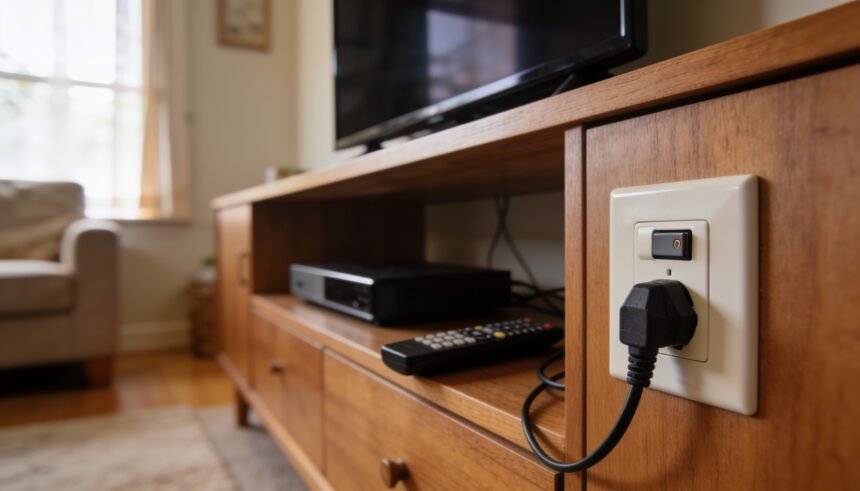
Australian Government appliance guidance recommends switching unused appliances off at the wall and following manufacturer instructions. Where that is appropriate, the plug can stay in place. You do not need to pull out a cable every night.
Choose a device with an accessible switch and a straightforward shutdown process. Finish its task and shut it down normally before cutting its supply. If you cannot reach or confidently identify the switch, leave that item for now. Make the first change something you can repeat without moving furniture.
Avoid making “everything beside the TV” a single rule. The equipment in that space may have different requirements. Sony’s OLED guidance, for example, says that disconnecting power during a panel refresh prevents that process from completing. Check your own television’s manual before making wall switching a habit.
For a shared desk, agree on when the workday actually ends. Someone finishing at five does not mean everyone is finished with the setup. Put the shutdown step after the last user’s session, rather than attaching it to an arbitrary clock time.
Measure a doubtful device before buying a solution
If you want evidence about a particular appliance, a plug-in power meter can help measure its consumption. South Australia’s energy guidance points residents towards library Home Energy Toolkits. Elsewhere, ask your library whether it offers a similar loan before buying equipment.
Use the meter according to its instructions and record the device’s mode alongside the reading. A result labelled only “TV” is less useful than one that says whether the television was playing, waiting in standby or completing another task. Keep comparisons to the same device under matching conditions.
Automation is optional. Government guidance describes smart plugs that schedule switching, but also notes that home automation adds its own standby consumption. It is therefore worth checking both the appliance and the proposed controller before assuming an extra device will save energy overall.
For an easily reached switch, first try the manual routine. Consider automation only after you have identified a specific switching job and checked that the appliance permits it. This article’s method does not require a purchase.
Review the routine after a normal week
Keep a note of what changed, who uses the device and any inconvenience. Review it alongside your household bill calendar, so the task has a place in existing admin rather than becoming another reminder to ignore.
Ask whether the household followed the routine, whether useful functions were lost, and whether any device should move back to the settings-review group. Judge the routine on those observations before expanding it to another room.
Keep this job separate from running air conditioning sensibly, which concerns equipment actively heating or cooling the home. If you are recording changes in your family budget, leave a hoped-for standby saving out of the figures until you have evidence for it.
Choose one device today. Find its power instructions, decide which between-use functions you need, and make one change that the next person using it will understand.
How we checked this
Reviewed on 28 September 2026 against Australian Government and South Australian Government energy guidance, plus PlayStation and Sony support documentation. The household routine is editorial guidance. No devices were tested and no saving is promised.
The one-page family week
One printable page that holds the whole week: meals, school, activities and who is doing the pickup. Free, and we send one useful email a week.
One email a week. No spam, unsubscribe in a click.